Fact checked

At MarketMates, we are committed to providing accurate information. Our content undergoes a rigorous process of fact-checking before it is published. Learn more about our editorial policy.
Last updated on November 4th, 2025
  Written by 
MarketMates Editorial Team
The MarketMates editorial team is led by ceo and co-founder Sam Eder, and consists of internal and external trading experts.
Our authors
  Reviewed by 
Sam Eder

Reviewer

Sam Eder
Sam is the cofounder and CEO of MarketMates. He has worked for brokers since 2008 and is the author of the Amazon best-seller 'The Consistent Trader.' His 'Advanced Forex Course for Smart Traders' has over 45,000 students.
Our authors

How to Read Trading Charts

A complete guide on how to read trading charts and trading patterns for day traders

5 ChatGPT Prompts to Help You Pass Any Prop Firm Challenge

Build a rules-based plan in minutes using AI.

In this article

Secure Broker-backed Funding for Traders.

Try simple, flexible ‘balance-based’ challenges. 

MarketMates Logo

The MarketMates promise

At MarketMates, we are committed to providing accurate information. Our content undergoes a rigorous process of fact-checking before it is published. Learn more about our editorial policy.

In this article

Learning how to read trading charts is one of the most fundamental skills every new trader will have to master.

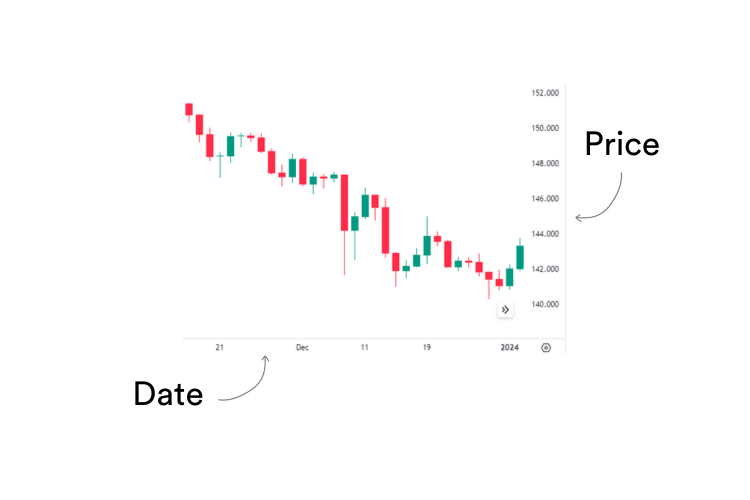
They are not just a series of candlesticks – they’re a complete record of the price movement of a particular asset.

Price charts tell an entire story about the price history of that asset, be it a cryptocurrency, a forex pair or a company stock, all on one screen.

That story can be as complex or as simple as you choose, depending on which charting software you use, and the views you choose to look at.  

Here we take a close look at how to read trading charts, and explain all about candlesticks and candlestick patterns.

Learn how to read trading charts

Most traders absolutely love trading charts!

After all, they are the main tool we use to make money, so what is there not to love about them?

Some traders get really hooked into the science of reading candlesticks and trading patterns.

This area of study is called technical analysis.  If you are a maths geek, you will find lots to keep yourself amused in the field of technical analysis!  

But traders don’t need to be maths geeks to read trading charts skilfully and use them to day trade successfully. 

Other traders become expert analysts who publish research and signals. 

In this introduction to how to read charts for trading, first I’m going to give you a rundown of the different types of charts that are available, and how to use them.

The basics of technical analysis

There’s three types of trading chart that you’ll come across if you are interested in technical analysis. These are:

  1. Line charts
  2. Bar charts
  3. Candlestick charts

Line charts

These charts plot the closing price of an asset in a single wavy line.

  • The price of the asset is at the side of the chart, known as the Y axis.
  • The base line of the chart, known as the X axis, represents time.

In my experience of teaching traders how to read trends on charts, many beginners forget which is the X axis, and which is the Y axis on a chart.

The simple way to remember this is, the letter Y has a vertical line in it, so is used to label the vertical axis.

The letter X written in cursive can look like buttocks, so it is used to label the horizontal axis, the ‘bottom’ scale!

The price action is sometimes in colours, showing rising price action in green or blue, and falling price action in red.

Simple line chart showing price action on a trading chart


What are line charts useful for?

A line chart is useful for providing a clear visualisation of the overall trend on the chart. 

It connects the closing price of the asset at regular intervals, such as daily, weekly, or monthly, with a continuous line.

Day traders use line charts to identify many types of patterns on the chart, and the general direction of price movement, whether it’s upward, downward, or sideways

They can also be used for:

Identifying trend direction

Line charts help us quickly identify the direction of the trend by observing the slope of the line.

  • an upward-sloping line indicates an uptrend
  • a downward-sloping line suggests a downtrend
  • a flat line represents a sideways or ranging market

Visualising support and resistance levels

We can use line charts to identify key support and resistance levels by observing where the price tends to bounce off, or encounter obstacles.

These levels are crucial for making trading decisions, such as determining entry and exit points or setting stop-loss orders.

Comparing multiple assets

It’s possible to compare the price movements of multiple assets simultaneously using line charts.

This comparative analysis helps identify relative strengths or weaknesses among different assets, and assists in making informed trading decisions.

OHLC bar charts

Bar charts are also known as OHLC charts, which stands for Open, High, Low, Close.

They give more detailed information than a simple line chart, because they show:

  • the opening price of the asset for that period (depending on what time frame you choose to view)
  • the lowest price the asset fell to in that period
  • the highest price achieved
  • the closing price for the specified period.

Therefore, there’s four solid pieces of information conveyed by a simple bar with two small hashes (little horizontal lines) either side of the main bar.

The price information that OHLC bars convey for a daily price chart is:

Trading chart OHLC bar examples showing the information conveyed by the bars


The opening price is always on the left of the bar, and the closing price to the right of it.

OHLC charts often use colour coding too.  On days when the closing price was higher than the opening price, the bars are coloured blue or green, indicating the price rose that day.

But on days when the price fell, the bars are coloured red.

Some charting programs use blue instead of green to show days when price action rose, but universally, red is used to denote falling price.

This example shows simple price action depicted in OHLC bars 

A trading chart showing OHLC bars in a row

These bars convey not just one piece of information like a line chart does (ie. closing price), but four pieces (open, close, high, low price.)

These four pieces of information are shown for each specified period depending on the timescale of the chart you’ve chosen.

For example:

  • an hourly chart shows open, close, high, low price action per hour
  • a daily chart shows this action per day

All charting programs allow you to change the timescale of the price action you’re watching, and to draw trendlines on the trading chart.

Chart timelines vary from one-minute charts, to hourly, daily, or monthly charts. The timeframe you choose will depend on whether you’re a day trader, a trend trader, or a longer-term investor. 

OCHL charts convey the same level of price information as candlestick charts, but some traders prefer them, for a few reasons:

  • Simplicity: OCHL charts provide a simplified representation of price movement compared to candlestick charts. Some traders prefer the straightforwardness of OCHL charts, as they focus solely on the open, close, high, and low prices without the additional visual elements of candlestick patterns
  • Clarity of price levels: OCHL charts emphasise the key price levels of each trading period. This clarity can make it easier for day traders to identify significant support and resistance levels
  • Preference for numerical data: Traders who prefer numerical data over visual patterns may favour OCHL charts for their clear and precise depiction of price levels.

Candlestick charts

These are the main type of charts that most traders use, whether they trade stocks, cryptocurrencies, forex or CFDs. 

Similar to the OHLC bars above, candlesticks also show us four elements of pricing action, the open, high, low and closing price.

However, they do this using a three-dimensional bar known as a candlestick.

The features of a candlestick are:

Body: The body of a candlestick represents the price range between the opening and closing prices of a trading session.

It is typically coloured or shaded to indicate whether the closing price was higher (bullish) or lower (bearish) than the opening price.

  • A bullish candlestick has a filled or green body, indicating that the closing price was higher than the opening price
  • A bearish candlestick has a hollow or red body, indicating that the closing price was lower than the opening price.

Bull and bear diagram

My beginner traders often forget which is bullish, and which is bearish price action.

A simple way to remember this is bulls FLICK UP with their horns, and bears SWIPE DOWN with their paws.

The Upper Wick (also known as the shadow or head):

The upper wick, also known as the shadow or head, extends from the top of the candlestick body and represents the highest price reached during the trading session.

The Lower Wick (shadow or tail):

The lower wick, shadow or tail is at the base of the candlestick body, and indicates the session’s lowest price.

The anatomy of a bearish candlestick:

A red trading candlestick with features marked


The anatomy of a bullish candlestick


A green trading candlestick with features marked

Who invented candlestick charts?

The history of candlestick charts dates back to 18th-century Japan, where a Japanese rice trader named Munehisa Homma is credited with developing this unique method of visualising price movements.

During his trading career, Homma observed that understanding market psychology and emotions played a crucial role in predicting future price movements.

To represent this information visually, he began using what eventually became known as candlestick charts.

A variety of candlestick shapes on a typical trading chart. Each candlestick shows you what the price action was for that specific time period, in this case each day, on a daily chart.

A variety of candlesticks on a price trading chart


At MarketMates, we use TradingView for our charting needs, but there are other charting software package available that are equally popular with forex and CFD traders. 

Candlestick Charts – Japan’s best-kept secret

Candlestick charting remained a well-guarded secret in Japan for centuries.

It wasn’t until the 20th century that the Western world gained access to this powerful charting technique.

In the 1980s, American author and technical analyst Steve Nison introduced candlestick charting to a Western audience through his groundbreaking book ‘Japanese Candlestick Charting Techniques.’ 

Candlestick charts are now the most popular form of charting used by most professional traders around the world.

Candlestick shapes

What the length of the candlestick body and wicks tell us.

The length of the candlestick body and wicks provides insight into the intensity of buying or selling pressure during the trading session.

  • Longer bodies and wicks indicate greater price movement and volatility
  • Shorter bodies and wicks suggest relatively subdued price action

For example: long candlesticks show price action that varies a great deal from the opening to the closing of the session or day:

A row of candlesticks on a trading price chart showing long red candlesticks


Long candlesticks tend to be seen during strong price trends, either up or down.

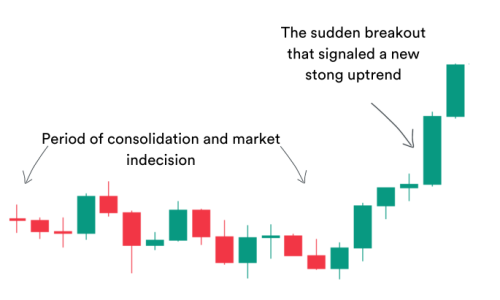
On the other hand, short candlesticks, and those that have no body (known as dojis) show indecision.

Dojis tend to appear when the market is consolidating, or moving sideways, like this:

A series of dojis on a trading chart showing market indecision


Not surprisingly, the green candlestick pattern above did develop into a strong upward breakout! 

A series of candlesticks on a trading chart showing a price breakout

If you want further information about the exact meaning of different candlesticks, refer to our MarketMates lesson all about candlestick chart patterns.

Chart timeframes

Trading charts give us an opportunity to study price action over a variety of timeframes.

The chart ‘timeframe’ refers to the duration or period over which each candlestick or bar on a price chart represents price data.

Different timeframes provide varying levels of detail, and are used by traders to analyse price movements and identify trading opportunities.

Common chart timeframes include:

Short-term timeframes:

Short-term timeframes typically range from seconds to minutes, then up to one hour.

These timeframes provide detailed information about price movements and are commonly used by day-traders and scalpers who execute trades within a single trading session.

Short-term timeframes allow traders to capture small price fluctuations and take advantage of short-term market opportunities.

Medium-term timeframes:

Medium-term timeframes typically range from four hours to one week. These timeframes offer a balance between detail, and broader market trends.

This makes them most suitable for swing traders who hold positions for several days to weeks.

Medium-term timeframes allow traders to identify and capitalise on intermediate-term price movements, while avoiding excessive noise from short-term fluctuations.

Long-term timeframes:

Long-term timeframes typically range from one week to one month or a quarter year or annual. These timeframes provide a broad perspective on market trends.

They are used by position traders and investors who take long-term positions in the market.

Long-term timeframes help traders identify major trends and significant support and resistance levels, allowing them to make informed decisions about long-term investment strategies.

Changing timeframes on your charting program

To change the timeframe on a price chart, traders can typically select their desired timeframe from a dropdown menu or toolbar on their trading platform or charting program.

Most charting programs offer a range of predefined timeframes, as well as the option to customise timeframes according to specific preferences.

For example, this is where the timeframe selection menu is on the charting platform I use, TradingView.

A screenshot to TradingView showing where to access timeframe settings

When choosing a timeframe for trading, traders should consider their trading style, objectives, and preferences:

Different timeframes for different trading styles

Traders alter their timeframe according to the view of the market they require.

Naturally, this aligns with the style of trading undertaken.

Day Traders:

Day traders typically use short-term timeframes, such as one-minute, five-minute, or 15-minute charts, to analyse intraday price movements and execute trades within a single trading session.

Swing Traders:

Swing traders often use medium-term timeframes, such as four-hour or daily charts, to identify continuation patterns, and swing highs and lows, to capture medium-term price swings over several days to weeks.

Position Traders:

Position traders and investors typically use long-term timeframes, such as weekly or monthly charts, to analyse long-term trends and make strategic investment decisions based on broader market movements.

Ultimately, the choice of timeframe depends on the trader’s individual preferences. There is no right or wrong.

When day-trading, I use 10-second and one-minute charts when I am actively trading.

However, I find it useful to occasionally sit back and change my perspective. I change my timeframe from minute charts to 4-hourly, and then daily, to get a bigger picture of price action.

My technique is to ‘stay in the zone’ on minute price action as I buy and sell. However, I always keep an eye out for trend reversals by having a constant eye on longer chart timeframes. 

Traders frequently use multiple timeframes simultaneously to gain a comprehensive view of the market, and to confirm trading signals across different timeframes.

Trading chart indicators

As well as raw price action, traders also use a variety of other tools to determine their entry points, stop loss positions and risk potential.

These are collectively known as indicators. There are literally hundreds of indicators to choose from.

Technical analysis indicators can either be displayed on top of the price candlestick pattern, or in a separate window below your trading chart.

We have described the 12 best indicators for forex trading in detail in this lesson. However, these trading indicators equally apply to cfd traders, or crypto traders. We all read price charts the same way. 

In addition, if you use TradingView as your charting program, here are some free indicators, so you can use the same ones as Sam does in his Forex Trading Course.

Indicators show alternative aspects of price action that candlesticks alone do not show, or don’t show clearly.

For example, these alternative aspects include:

Trend direction

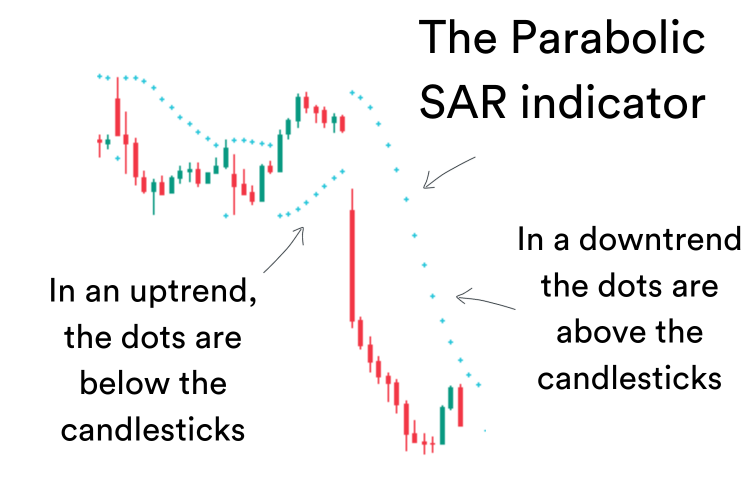
Indicators such as the Supertrend indicator and Parabolic SAR indicator plot the trend direction on top of price action candlesticks.

These indicators take the guesswork out of knowing trend direction.

For example, here is the Parabolic SAR indicator (the blue dots) on top of price action indicating trend direction:

A trading chart showing the Parabolic SAR indicator overlaid on top of price candlesticks


Here is the Supertrend indicator showing trend direction for the same trading period:

A trading chart showing the Supertrend indicator superimposed on price candlesticks


Both these indicators do a similar job, so there’d be no point in having both indicators on display on your price chart at the same time. 

However, do you notice that the Parabolic SAR indicator is slightly more sensitive than the Supertrend indicator?

Look at the signals given by both indicators just before the long red candlestick, and compare the difference.

This illustrates the difference in sensitivity between various indicators – some may be more responsive or sensitive to small changes in price action than others.  

Momentum

Momentum is a measure of how much strength there is in a trend.

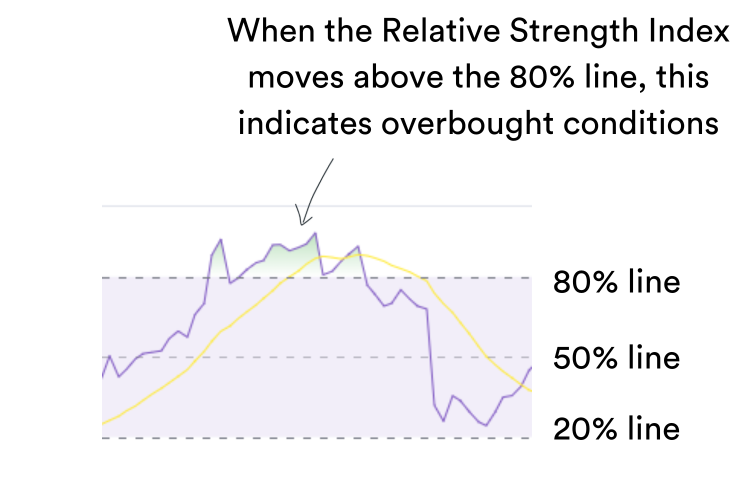
It is also an indicator of when an asset has become overbought or oversold.

Overbought

When an asset is considered overbought, it means its price has risen sharply and quickly, often reaching an unsustainable level. 

There is a high probability the asset’s price may soon reverse and move downward. This information is invaluable to help you make informed investment decisions.

Oversold

When an asset is considered oversold, it means its price has declined sharply and quickly, reaching a level that is significantly below its intrinsic value. In this position, there is a high probability that the asset’s price may soon reverse and move upward.

Indicators such the Relative Strength Index (RSI), Bollinger Bands, and the Stochastic Oscillator are all momentum indicators.

(Here you can learn all about how to use Bollinger Bands. It is my colleague Sam’s favourite indicator.)

All these indicators tell us how strong an asset’s price trend is, and when it is likely to reverse.

Naturally, this is crucial information all traders need when determining if they are going to trade, what direction to trade in, and their entry, exit and stop loss positions.

The Relative Strength Index showing overbought conditions:

The RSI indicator on a trading chart showing oversold conditions


The Stochastic Momentum indicator showing overbought and oversold conditions:

A trading chart showing the Stochastic Momentum indicator

Average price

There are also indicators that can smooth out price action and tell us average price figures over a user-defined period.

Some traders display a Simple Moving Average price line over their candlestick bars to smooth out price action, and help determine relevant stop-loss positions.

Price action with a simple moving average to smooth out ‘noise.’

A trading candlestick chart with a Simple Moving Average line superimposed on price action


Crossovers between different moving average (MA) price lines can form a trade entry signal for traders using a moving average entry system.

When I’m day-trading CFDs, I use a simple ‘Golden Crossover’ between the 20-day MA and the 5-day MA as a trade entry signal. 

An example of a moving average crossover:

A trading chart showing a Simple Moving Average Golden Crossover pattern


There are also indicators that can show us the difference (or convergence) between moving averages of different timeframes.

The MACD indicator

The Moving Average Convergence Divergence (MACD) indicator is a trend-following momentum indicator that calculates the difference between two exponential moving averages.

It consists of three separate parts:

  • The MACD line – shown below as the blue line. This line is calculated by taking a longer-term exponential moving average (EMA), which is usually the 26-day EMA, and subtracting it from a shorter EMA, usually 12-days.
  • The Signal line – show as the yellow line. This is the EMA of the above MACD line, so effectively it’s an indicator of an indicator. The usual period for the Signal line is nine days.
  • The MACD Histogram – this plots the difference between the MACD line and the Signal line. The MACD histogram oscillates around a zero line. Basically, if there is a big difference (divergence) between the MACD line and the Signal line, the bars of the histogram will be long. If the two lines are closer together, the histogram will not show long bars.

Don’t worry if all this maths leaves you feeling confused. The fact is, I’m no maths guru either. At school, maths was my most disliked subject, and I wasn’t very good at it!

However, I made a very successful living day-trading full time for many years, proving that you don’t have to understand the maths behind how the indicators are configured to be able to use them in your trading.

The MACD is displayed below candlestick price action, in a separate window, as shown below.

A trading chart showing the MACD indicator below candlestick price action
A trading chart showing the MACD below candlestick price action


What you do need to understand to use this indicator is this:

  • if the MACD line is going up, and the histogram bars are getting taller, then upside momentum in price action is increasing. This means more buyers are willing to pay a higher price, and so are pushing the price up. The bulls are in control!
  • on the other hand, if the MACD line is negative (below the centre line) and price is falling, then downside momentum is getting stronger. The bears have taken over!

The MACD indicator is a very popular indicator with traders.

It effectively tells you how strong the bulls or bears are pushing to move price action in their direction.

Once you understand this concept, and get accustomed to reading an MACD indicator, it can be a very useful tool to assist you to determine how strong momentum for a trend change is.

However, don’t make the mistake of using the MACD indicator to show you overbought or oversold price action – as it is not intended for this purpose.

In the following example:

  • dojis at the top of the uptrend confirm that a trend change in direction is taking place
  • the blue MACD signal line crosses the yellow signal line from above, indicating the trend change is underway
  • the MACD line slopes steeply downwards, indicating that a sharp downtrend is happening – the bears are now in control
  • as the red histogram bars get longer in length, this indicates that momentum for the downtrend is increasing
A trading chart with the MACD indicator showing a crossover indicating direction change

Trading chart setup

The way a trader sets up forex or stock trading charts is as personal as the clothes we wear.

Some day traders love a busy chart screen, with a multiple of indicators on display. Their charts can sometimes end up looking like the cockpit of an jet plane!

Other traders like to keep it simple, and only display one or two indicators.

I’d suggest beginner traders start with two simple indicators to show price trend, momentum, overbought and oversold conditions, and perhaps average price if you are stock trading.

For example, displaying the MACD indicator, combined with Bollinger Bands on your chart screen over your price candle sticks will tell you all you need to know to make great trading decisions.

Trading chart patterns

Just like learning to read music, the more you practice reading trading charts, the better you’ll get at it.

There are many nuances to take into consideration when looking at candlestick price action and trading patterns.  For example:

  • the shape of individual candlesticks, each telling you a story about price action for that specific period
  • how candlesticks combine together into patterns such as head and Shoulders, Morning Stars and Evening Stars, to give a stronger indication about price direction and reversals
  • how rows of candlesticks over time form triangle and wedge patterns, revealing support and resistance price lines that can be used to time trade entries, and position stop-loss orders
  • how breakouts are revealed when price action suddenly goes above, or below established support and resistance lines

Now, add in different indicators on top of candlestick price action, and you start to get a more ‘three dimensional’ view of what is happening in the market.

Change the timeframe of the chart, and that view may totally change, even though you’re viewing the exact same price action. 

Indicators give traders yet more detailed insights into what is happening with price action, such as:

  • how far the price action has strayed away from its average over a set time period
  • how strong the push is from the bulls or bears to move price action in their direction
  • when price action goes into overbought or oversold territory, warning that it may quickly reverse back closer to the average

As you progress down your trading journey, you can experiment with different indicators and add more information to your trading charts.

Best chart reading advice for novice traders

As a novice trader, the best advice I can give you is this:

  • practice reading trading charts often. I frequently tell my students to cover up price action to the right of a particular pattern, and try to predict ‘what happens next?’ See how often you are right!
  • as you become more experienced in reading trading charts, you’ll get more accurate and better at playing the ‘what happens next?‘ game
  • at first, use only one or two simple indicators, and keep your charts uncluttered as you learn to trade
  • as you get more experienced, and your eyes become accustomed to seeing what is really important on a trading chart, you may wish to add more indicators. But start with the simple tools you need, and add more later if needed
  • get to know the subtleties and nuances of the indicator tools you are using – the better you can use your tools, the better tradesman you’ll become!
  • don’t chop and change your chart view – rather keep it consistent, without too much unnecessary information to overwhelm your brain
  • as you trade, keep an eye on at least two different timeframe charts – one short term, for the immediate price period you are trading, and a second one showing you the bigger picture of what is happening

When I was day-trading CFDs full time (which I did for many years, with consistent profitability), my trading set-up looked like this:

  • a one-minute chart, to show me immediate price action
  • an hourly chart, to show me what had happened over the past two or three days
  • a daily chart, so I was aware of price action over the past 30-days

I kept these chart windows open at all times on one of my three large monitors, so my eyes became accustomed to finding the exact price information I required without having to hunt for it.

Naturally, if you are trading on your mobile phone, you won’t have the luxury of being able to display multiple chart timeframes simultaneously.

However, it can still be very useful to switch chart timeframes from time to time as you are considering your trade entries and set-up.

If you like this article, then sign up for our newsletter, or join over 42,000 other traders and get The Advanced Forex Course for Smart Traders 2.0. It’s 100 % free.

Till next time, happy trading!

Cate Signature

Sources

Marketmates uses only high-quality sources, including peer-reviewed studies, to support the facts within our articles. Read our editorial guidelines to learn more about how we fact-check and keep our content accurate, reliable, and trustworthy.

  1. Munehisa Homma – Candlestick Charts  https://en.wikipedia.org/wiki/Candlestick_pattern
  2. Steve Nisan – Japanese Candlestick Charting Techniques  https://candlecharts.com/
  3. Charting software – TradingView.com TradingView.com/chart 
  4. John Bollinger – Bollinger Bands 
    https://www.bollingerbands.com/

Secure Broker-backed Funding for Traders.

Try simple, flexible ‘balance-based’ challenges. 

Picture of MarketMates Editorial Team

MarketMates Editorial Team

The MarketMates editorial team is led by ceo and co-founder Sam Eder, and consists of internal and external trading experts.
Picture of MarketMates Editorial Team

MarketMates Editorial Team

The MarketMates editorial team is led by ceo and co-founder Sam Eder, and consists of internal and external trading experts.

5 ChatGPT Prompts to Help You Pass Any Prop Firm Challenge

Build a rules-based plan in minutes using AI.

The Advanced Forex Course

for Smart Traders 2.0

Join over 42,000 traders and get FREE access to 17+ lessons and five hours of on-demand video based on the famous ‘Market Wizards’.

Keep Learning

Bank Desk Weekly
Sam Eder

Bank Desk FX Weekly 24 August 26

The US dollar remains under pressure, but this week could decide whether the weakness has further to run. PCE inflation and Fed Chair Kevin Warsh at Jackson Hole are the

Bank Desk Weekly
Sam Eder

Bank Desk FX Weekly 17 August 26

The US dollar starts the week under pressure as weaker jobs, inflation and retail data reduce expectations for another Fed rate increase.

Bank Desk Weekly
Sam Eder

Bank Desk FX Weekly 10 August 26

Weak US jobs have pushed the dollar lower and reduced expectations for further Fed rate hikes. Banks remain divided on what comes next, with US CPI, the RBA decision and

marketmates

Join over 42,000 Traders. 100% FREE.

The Advanced Forex Course
for Smart Traders